
Find your way
Folders
Organize guests into folders backed by Proxmox pools, drag guests between them, and give each folder its own permissions, summary and charts.
In VMs & Templates, your guests sit in folders, the way they do in vCenter. Each folder is a Proxmox pool, shown as a tree. Because they’re pools, the same folders appear in Proxmox’s web interface, and they carry permissions: give a team access to a folder and they can use exactly the guests in it.
- Folders nest up to three levels deep, Proxmox’s own limit.
- A guest is in one folder at a time.
- Guests in no folder are listed under Unfiled.
Make a folder
Choose New Folder… from the datacenter’s or a folder’s Actions menu (from a folder, the new one goes inside it). Give it a Name and, if you like, a Comment.
Move guests into a folder
Drag a guest onto a folder in the sidebar.
Or choose Move to Folder… from a guest’s Actions menu and pick the folder, or Unfiled (no folder) to take it out of every folder.
Either way, Moxie Prox asks first and tells you how permissions change: the new folder’s permissions apply to the guest, and those of the folder it leaves no longer do.
Known issue in 1.3. The confirmation’s Move button may need to be pressed twice. A fix is on the way.
Folder pages
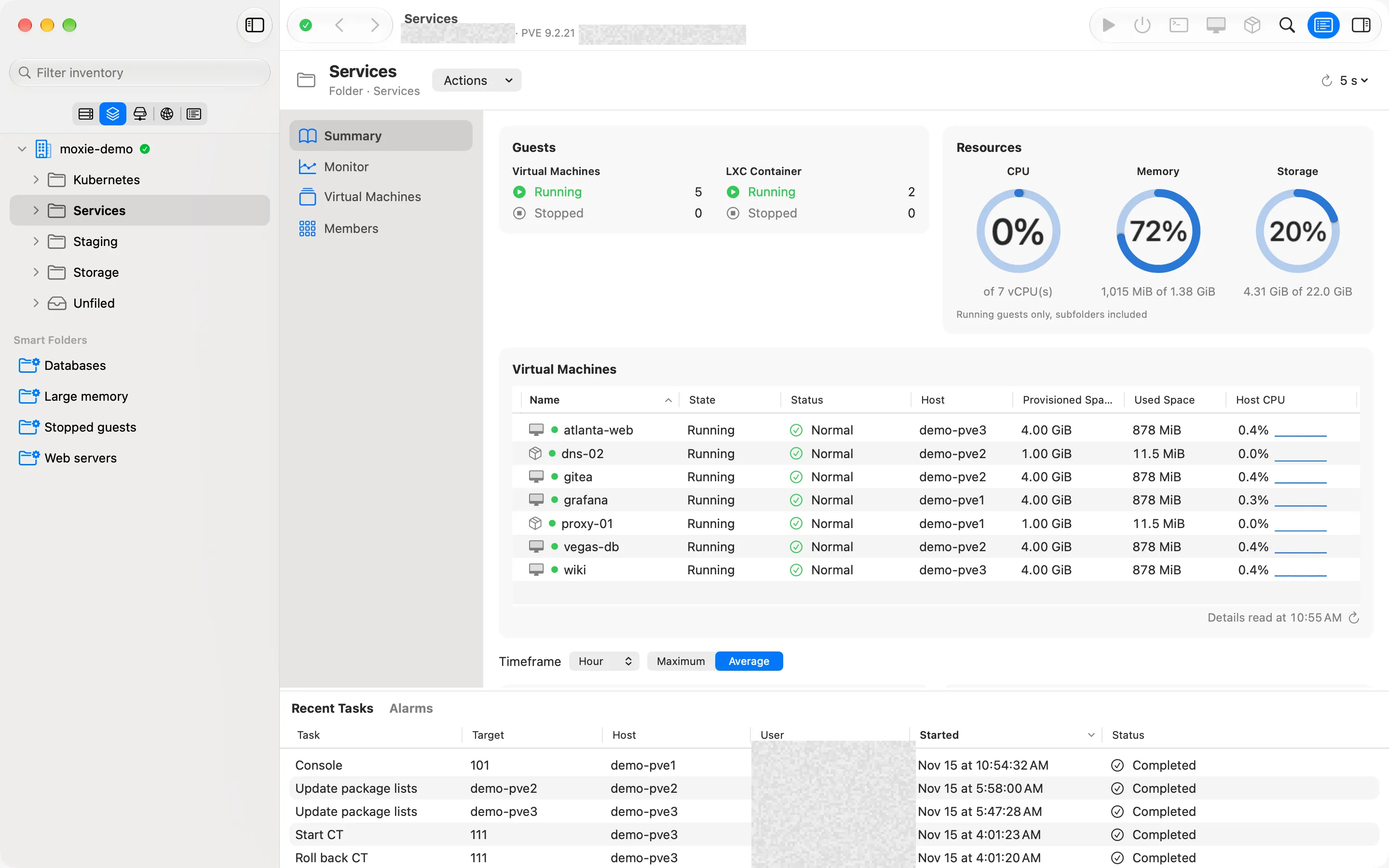
Select a folder to see:
- Summary: how many guests it holds, their CPU, memory and storage totals, with charts.
- Monitor: charts of its busiest guests.
- Virtual Machines: a table of its guests, with the columns, filter and export of Lists, and extra fields such as guest OS and IP address (see Search).
- Permissions: who may do what in the folder, as on any Proxmox pool.
- Members: add guests with Virtual Machines and Containers… and storage with Storage…, or remove them.
Change or delete a folder
Edit Folder Comment opens Datacenter › Pools, where you change its comment. Proxmox can’t rename or move a pool, so Rename… and Move To… are dimmed and say so.
Delete Folder… removes the pool and the permissions set on it, after a confirmation that names it. Proxmox deletes only empty pools, so move its guests and storage out first; if it isn’t empty, Moxie Prox says what’s still in it.
Checked against Moxie Prox 1.3. Updated November 9, 2026.